

The other day, I was trying to send a critical private message on Linkedin.
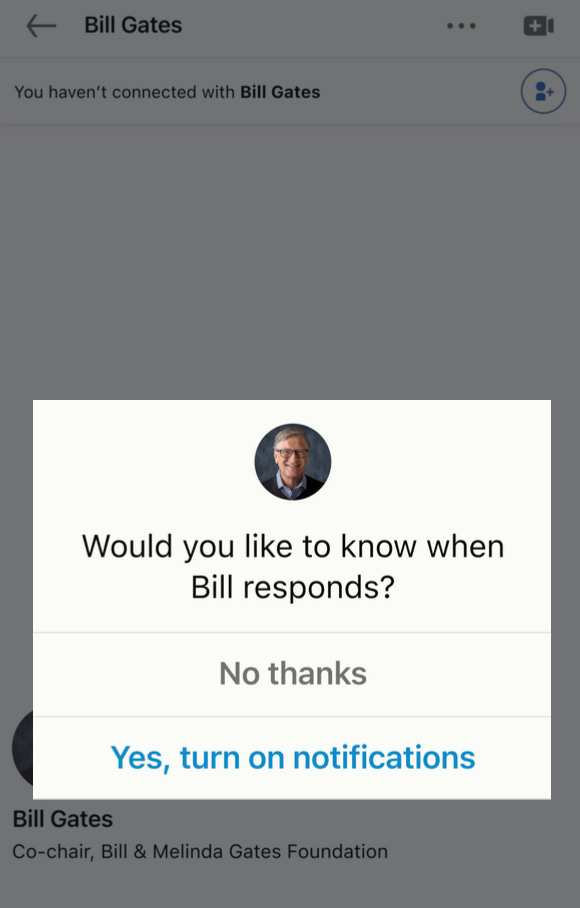
And because my phone notifications were disabled, as soon as I sent my message, Linkedin showed me this popup. . .
Especially compared to this notification permission request popup, that'd randomly appear when you log in.
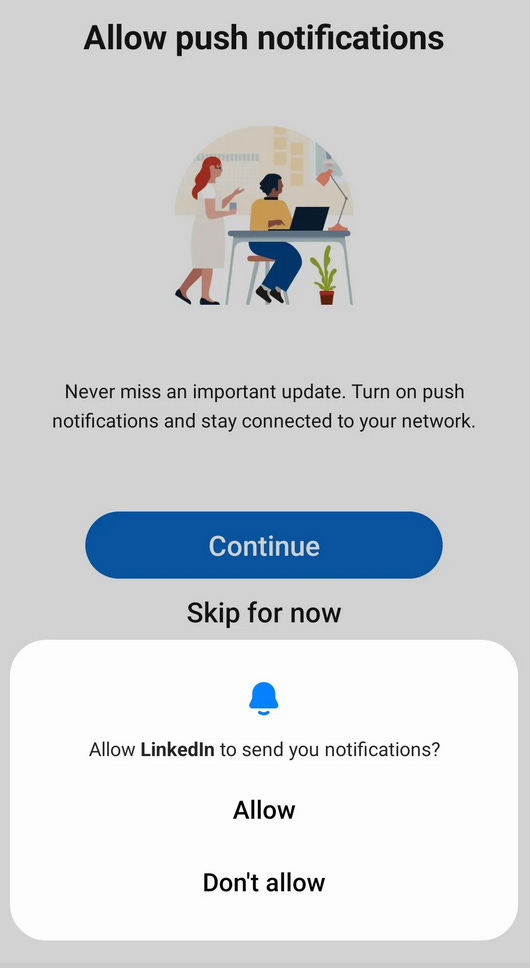
The initial prompt is better due to the following four reasons,
Context: If a user has invested time in doing some activity, they would most likely want to get notified about the next trigger. In this case, since I have invested time in sending a message, I would want to get notified on receiving a response.
Micro-commitment: The concept of micro-commitment, where people feel more comfortable taking small, incremental steps that are in line with their previous actions, is a powerful motivator. By leveraging this idea, companies like LinkedIn can encourage users to engage with their platform in ways that feel less intimidating or overwhelming.
For example, LinkedIn may use a contextual question, such as "Would you like to activate notifications for new job postings?" to encourage users to take a small action that is consistent with their prior activity on the site.While this may seem like a small detail, this first step can be incredibly crucial. For instance, reactivating iOS notifications after they have been disabled can be a significant ask. By framing the request in a way that feels manageable and non-threatening, LinkedIn is more likely to elicit a positive response from users. This, in turn, can lead to greater engagement and use of the platform, ultimately benefitting both the company and its users.
Human: The emphasis of the prompt is on a particular instance of human interaction rather than solely on the product itself.
Singularity Effect:The Singularity Effect suggests that individuals tend to care more about specific, identifiable people than abstract concepts or groups. In line with this phenomenon, LinkedIn has implemented a clever approach by displaying the name and profile picture of the person you just messaged, rather than using vague notifications such as "know when a connection answers."
Value:
The concept of value is centered on the advantages or benefits that I derive from a product or service (knowing when Bill Answers), rather than on abstract characteristics such as alerts, sounds, or badges.Conversational:
In conversational settings, it is often more convenient to provide a straightforward "yes" or "no" response. Afterall, when was the last time you responded with the word "Allow" to a question posed to you in real life?
This feature is not only beneficial to me, but according to LinkedIn's product team, it also results in 5 times higher conversions compared to the default triggers.
Recapturing Permissions
Retaining users is heavily reliant on notifications. However, approximately 50% of users tend to block them.
Furthermore, when a user selects "Don't Allow" for a notification request on iOS, it becomes impossible to prompt them again. This makes it extremely challenging to re-engage with such users.
Nevertheless, by leveraging behavioural retention triggers, Linkedin has successfully attained a conversion rate of 5-10% (as compared to the 1-2% for random prompts) and can gradually rekindle user engagement by delivering the notifications they find valuable (and have requested).
These retention triggers can be customized to suit any type of product, whether it is B2B, B2C, mobile, desktop, etc.
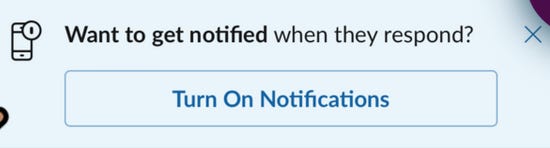
For instance, let's take an example from Slack.
The key is to show your users that you understand that their attention is precious and
that you won't abuse it.
Retention Triggers Checklist:
4 Steps To Implement Retention Triggers,
1. Identify: Find the most important actions in your product
(e.g., view report, send a message, upsell CTA).
2. Scope: Map out when they happen in your customers' journey. Pay close attention to what happens right before and after.
3. Ideate: Brainstorm 3 experiment ideas to make the prompts more timely, valuable & incremental for your customers.
4. Experiment: Run an experiment and compare your cohorts' conversions.
Checklist for Implementing Retention Triggers:
Implementing retention triggers can be a powerful way to improve customer engagement and retention for your product. Here are the four steps you can follow to implement retention triggers effectively:
Identify the most important actions in your product: Begin by identifying the most important actions that your customers take when using your product. These might include actions such as viewing a report, sending a message, or clicking on an upsell CTA. By focusing on these actions, you can identify the key triggers that will help to retain your customers.
Scope out when these actions occur in your customers' journey: Once you have identified the most important actions in your product, map out when they occur in your customers' journey. Pay close attention to what happens right before and after these actions, as these are often the moments when customers are most receptive to retention triggers.
Ideate and brainstorm experiment ideas: The next step is to brainstorm at least three experiment ideas to make the prompts more timely, valuable, and incremental for your customers. For example, you might experiment with personalized messaging, offering rewards or incentives for completing certain actions, or creating urgency around time-limited offers.
Experiment and compare cohort conversions: Once you have your experiment ideas, it's time to run an experiment and compare your cohorts' conversions. Monitor the impact of your retention triggers and make adjustments as necessary to continue improving customer engagement and retention. By following these four steps, you can implement retention triggers that are tailored to your customers' needs and that help to drive long-term customer loyalty.
