Google Keep
Fixing Retrieval, Retention, and Scale in Mobile Note-Taking
Overview
Google Keep is Google’s lightweight note-taking app (mobile apps + web) for quick captures: text, lists, images, audio, labels, color-coding and reminders. It’s deeply integrated into Google’s productivity ecosystem (Docs/Calendar/Tasks).
Launched in 2013, Google Keep is optimized for instant capture, not long-term recall. It succeeds as a scratchpad but breaks as users scale from tens to hundreds of notes.
Market Analysis
Competitive landscape
Google Keep is in the “fast capture / lightweight scratchpad” space. Following are its competitors,
Lightweight scratchpads: Apple Notes, Samsung Notes. (High-Speed, Instant capture) .
Productivity Tools: Notion, Microsoft OneNote, Evernote, Obsidian. (Rich formatting, hierarchical organization, databases, templates)
Regional players like Zoho Notebook.
Strengths: Lightweight, High Speed, Cross platform, near-zero friction (single sign-on with Google account), deep integration with Google ecosystem (Docs, Calendar, Assistant), Preinstall/Play Store distribution on Android.
Weakness: Lack of Scale, Structure, Advanced and AI Features, Productivity.
Global TAM & Growth
Global smartphone users: ~5B
Notes app users (Android + iOS): ~25%
User TAM = 5B × 25% = ~1.25B users
ARPU =~$8 (assuming)
Revenue TAM: The global note-taking market is ~$10B in 2025 , growing at ~22% CAGR ((REF1, REF2)), with AI note-taking expected to triple in revenue.
Monetization
Google Keep is free for consumers and included with Google accounts. Monetization is indirect: retention of users in the Google ecosystem increases Google account value, ‘Google One’ and ‘Google Workspace’ adoption.
Because Keep has no direct revenue, it competes poorly for roadmap investment versus paid Workspace products, allowing competitors to out-innovate on power features.
User Segments
Core User Segments:
Quick-capture consumer: Needs fast notes, shopping lists, voice memos; low friction, multi-lingual.
Students & Researchers: Quick checklists, photo captures of whiteboards/notes.
Light knowledge workers (embedded in Google Workspace): Uses Keep for short notes, meeting bullets and to push content into Docs/Calendar.
Power note-takers, Journals: Prefer OneNote, Notion, Obsidian for long-form, hierarchical organization.
User Personas:
Quick-Capture Consumers (“Rahul”)
Casual smartphone users who needs fast capture (shopping lists, reminders, quick notes).
Jobs-to-be-done: Capture ideas/lists quickly, set reminders, access across devices, multilingual voice/notes capture.
Pain points: Losing notes, Clutter as notes accumulate. flat hierarchy, 20k character limit, poor retrieval.
Student & Researcher (“Aryan - Student”)
Students capturing lecture notes, images of whiteboards, voice memos, and short drafts, checklist.
Jobs-to-be-done:: Capture, annotate, search by image/text, sync between phone/tablet.
Pain points: Poor organization for long-term study, Character limit, Difficult to find relevant notes, weak multi-note linking.
Quick-Capture Consumers (“Rahul”)
Casual smartphone users who needs fast capture (shopping lists, reminders, quick notes).
Jobs-to-be-done: Capture ideas/lists quickly, set reminders, access across devices, multilingual voice/notes capture.
Pain points: Losing notes, Clutter as notes accumulate. flat hierarchy, 20k character limit, poor retrieval.
Student & Researcher (“Aryan - Student”)
Students capturing lecture notes, images of whiteboards, voice memos, and short drafts, checklist.
Jobs-to-be-done:: Capture, annotate, search by image/text, sync between phone/tablet.
Pain points: Poor organization for long-term study, Character limit, Difficult to find relevant notes, weak multi-note linking.
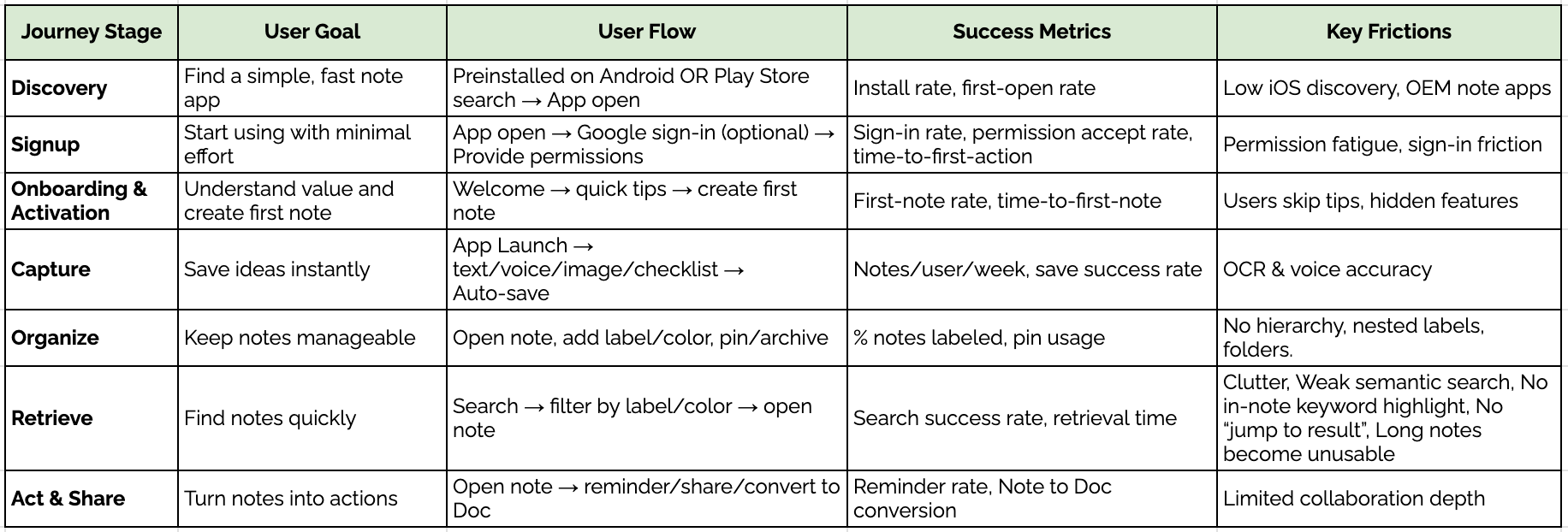
User Journey
Acquisition & Virality
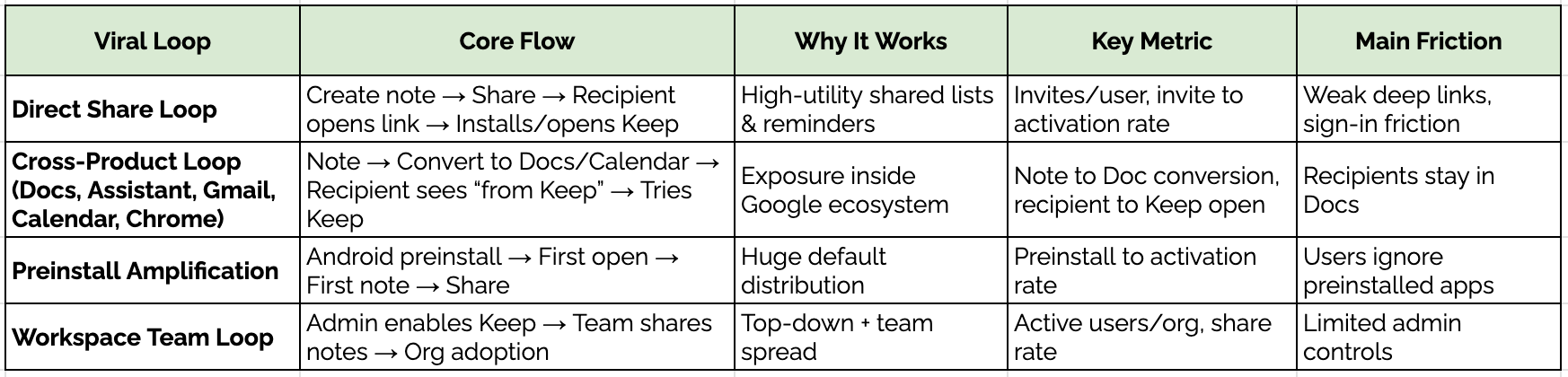
Acquisition channels
Pre-Installed in Android Devices and Play Store visibility on Android.
Cross-promotions inside Google apps (Docs, Assistant, Gmail, Calendar, Chrome).
Word-of-mouth or personal sharing when users sharing notes, lists, or reminders with others.
Enterprise IT admins enabling Keep for employees as part of Workspace.
Engagement & Retention
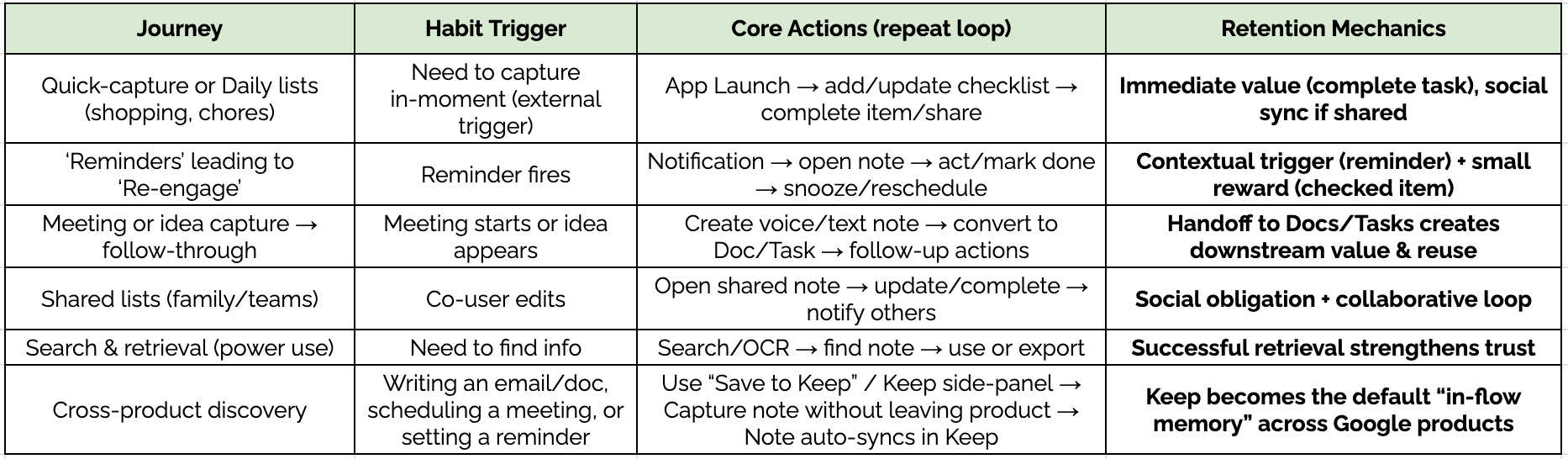
Core mechanics that keep users coming back,
Quick Onboarding & Instant capture: “Take a Note” and Voice capture reduce time-to-first-note and make capture easy & habitual.
High-utility notes & lists: Shopping lists, checklists, quick reminders produce repeated, immediate value.
Reminders as triggers: Reminders re-engage users time to time.
Cross-device access: Seamless access on mobile/web/desktop maintains ease of access and habitual use.
Lightweight share + Collaboration: Shared lists create social obligations to return and update notes.
Ecosystem integration: Convert-to-Docs / Calendar / Tasks ties Keep closely with other ecosystem products.
Visual coding: Colors, pins, labels make retrieval faster and reinforce repeat behavior.
Core Problem Analysis
Google Keep works well for quick notes but doesn’t scale as users accumulate hundreds of notes. As note volume grows, users outgrow the product and migrate to tools like Notion or OneNote, leading to churn instead of long-term retention.
Search can find the right note, but doesn’t jump to or highlight the relevant content inside it. Users waste time scanning long notes, making the app unreliable for recall, search succeeds, but user action fails.
Notes are limited to plain text without formatting options - bolding, headings, bullets, tables or structure. Students and professionals can’t create readable, structured notes, blocking serious academic and work use cases.
Notes are organized only via flat labels, with no folders or nesting. High-density users (students, researchers) struggle to manage large knowledge sets and abandon the app for more structured tools.
Sensitive notes are fully visible in the tiled view by default. In crowded environments like metros or buses, users risk shoulder-surfing, reducing trust and discouraging usage for private information.
Google Keep has no direct revenue model. The product competes poorly for roadmap investment internally, slowing feature evolution and allowing competitors to pull ahead.
Tasks captured as checklists or notes lack clear status, due dates, and progress visibility, and are fragmented across Keep and other Google apps. Users can’t reliably track what’s pending, completed, or overdue, reducing trust in Keep as a task management tool and daily productivity.
Users can’t create real handwritten notes using a stylus or finger. This limits use cases for students, educators, and tablet users.
Solution