

This post is for our Paid Subscribers. If you haven’t subscribed yet,
Before jumping into solutions, I want to make sure I understand the scope and constraints of this question clearly.
Step 1: Ask Clarifying Questions
Q: When we say “improve the overall user experience,” which part of the product are we prioritising — navigation and routing accuracy, place discovery and recommendations, or the end-to-end experience from intent to arrival?
These are different problems with different solutions. Navigation accuracy is an infrastructure and data quality problem. Place discovery is a richness and trust problem. I want to be deliberate about which we are solving. For this answer I will treat both as in scope but will identify where they require separate solution tracks.
Q: Which surface are we focusing on — iPhone on foot, iPhone while driving, CarPlay, Apple Watch, or all of them?
Apple Maps is genuinely multi-surface. CarPlay is in over 800 car models and has different constraints from the handheld experience. I will anchor on the iPhone experience and flag where CarPlay creates additional opportunities or constraints, since it is the surface where trust failures are most costly.
Q: What is the business objective behind improving the experience — reducing Google Maps install rates among iPhone users, deepening Services ecosystem engagement, or defending the privacy brand?
All three are related. I will treat all three as valid goals and try to propose solutions that advance them simultaneously, but I will note where there is tension, particularly between adding richer social data and preserving Apple’s no-tracking privacy promise.
Q: Should I treat Apple’s privacy stance as a hard constraint, or as one factor to balance against user experience quality?
I will treat privacy as a hard constraint and design around it. Apple’s privacy differentiation is one of its few genuine advantages over Google in this category. Solutions that compromise it to close the richness gap are self-defeating because they eliminate the one reason a user should choose Apple Maps over a Google product that has had a decade-long head start on data.
Q: Are we scoping to a specific geography, or thinking globally?
I will anchor on the US market where the Google Maps trust gap is most acute and the competitive stakes are highest, but I will flag solutions that are especially relevant for high-growth markets like India where Maps is playing catch-up even more aggressively.
Q: What is the time horizon — a single iOS release cycle of roughly 12 months, or a multi-year product arc?
I will design a 12-month roadmap with clear phases but will flag which investments require longer incubation, particularly anything that involves new data partnerships or hardware-level sensing improvements.
My working frame: improve Apple Maps for iPhone users in the US by closing the two gaps that cause people to install Google Maps despite having Maps as their default — the navigation trust gap (I am not confident this route is correct) and the discovery richness gap (I cannot find what I am looking for) — while keeping privacy as a non-negotiable constraint and deepening the cross-device ecosystem advantage that Google cannot replicate.
Step 2: Describe the Product
Apple Maps launched in September 2012 as the replacement for Google Maps on iOS 6, and the launch is still one of the most notorious product failures in Apple’s history. Missing transit directions, wrong business locations, and a Flyover mode that warped reality sent users scrambling back to Google and prompted Apple’s CEO to issue a public apology — a genuinely rare event. In the decade since, Apple has rebuilt the maps dataset from scratch, acquired multiple mapping data companies, deployed a fleet of survey vehicles, and incrementally closed the accuracy gap. The current product is genuinely competitive on navigation in most major US cities. The trust problem is now more perception than reality, but perception is its own product problem.
Core Surfaces
Turn-by-turn navigation: Driving, walking, cycling, and transit directions with real-time traffic, incident reports, and dynamic rerouting. Available on iPhone, iPad, Apple Watch, CarPlay, and Mac.
Look Around: Street-level imagery with smooth 360-degree exploration, available in major US, European, and Japanese cities. Apple’s equivalent of Google Street View, with a technically superior rendering engine but narrower coverage.
Detailed city maps: 3D building models, indoor maps for airports and malls, and detailed pedestrian-level mapping for dense urban areas. Currently available in select cities including New York, San Francisco, London, and Tokyo.
Place search and business listings: Search for restaurants, gas stations, parking, and points of interest. Listings include hours, ratings aggregated from Yelp, photos, and links to make reservations via OpenTable.
Guides: Curated collections of places from third-party publishers and brands, covering categories like restaurants, shopping, and activities in specific cities.
Flyover: Photorealistic 3D city tours using drone imagery, primarily a showcase feature with limited utility in everyday navigation.
CarPlay integration: Full Maps functionality on in-car displays, with an interface optimised for driving. Available in over 800 car models across 45 countries.
Siri and Shortcuts integration: Voice-driven navigation commands, location sharing, and home/work shortcuts deeply embedded into the iOS system.
Key Metrics
Pre-installed on over 1.5 billion active iPhones globally — the largest distribution footprint of any mapping product by installed base
Google Maps has approximately 1 billion monthly active users globally; a significant share of those are also iPhone users who chose to install Google despite having Maps
CarPlay available in over 800 vehicle models, with an estimated 80 million CarPlay-equipped vehicles on US roads
Look Around coverage available in approximately 100 cities, versus Google Street View’s coverage of over 220 countries and territories
Apple does not disclose Maps-specific MAU, revenue, or market share figures, which itself reveals that Maps is not a standalone revenue product — it is a retention and ecosystem tool
Yelp ratings are the primary review source for listings, compared to Google’s own review corpus of over 200 million business reviews globally
Mission and Competitive Context
Apple Maps exists to serve two strategic purposes: keep users inside the Apple ecosystem by eliminating the need to install a Google product, and reinforce Apple’s privacy brand by demonstrating that useful, location-based services do not require surveillance. Unlike Google Maps, which is a direct revenue product generating billions annually through local business advertising, promoted pins, and data licensing, Maps is entirely defensive and ecosystem-serving for Apple. This creates a genuinely different design brief. Apple Maps does not need to maximise session length or ad impression volume. It needs to be good enough that no one reaches for Google Maps instead — a “negative churn” objective rather than a growth one.
The competitive reality is that Google Maps has compounding advantages in data density: more business reviews, more verified photos, more frequently updated hours, better coverage of public transit in emerging markets, and a more sophisticated recommendation engine trained on billions of search sessions. Yelp, which supplies Apple’s review layer, has declining engagement and user-generated content compared to its peak. Apple’s response cannot be to replicate Google’s data flywheel — that would take years and would require compromising on privacy. The response has to be to find the problem spaces where Apple’s unique assets (device integration, on-device ML, first-party hardware sensors, the ecosystem) create a moat Google cannot cross.
Step 3: Define the Goal
Primary goal: Reduce the Google Maps install rate among iPhone users from its current level by 8 percentage points over 12 months, while improving weekly active navigation sessions per active iPhone user by 15%, by closing the two core trust gaps — navigation confidence and discovery richness — without compromising Apple’s privacy architecture.
This goal matters for two reasons. First, every iPhone user who installs Google Maps is a signal that Apple Maps failed its core retention mission. Google Maps on an iPhone is not neutral — it establishes a Google identity signal, creates cross-device continuity toward Android, and weakens the Services ecosystem stickiness that drives Apple’s highest-margin revenue. Second, the weekly active navigation session metric captures whether users are building a Maps habit or treating it as a fallback. A user who opens Maps once a month when lost is fundamentally different from a user who opens it daily for commute routing, restaurant discovery, and ETA sharing. The daily user is the one who never installs Google Maps. Building that habit is the goal.
Step 4: User Segmentation
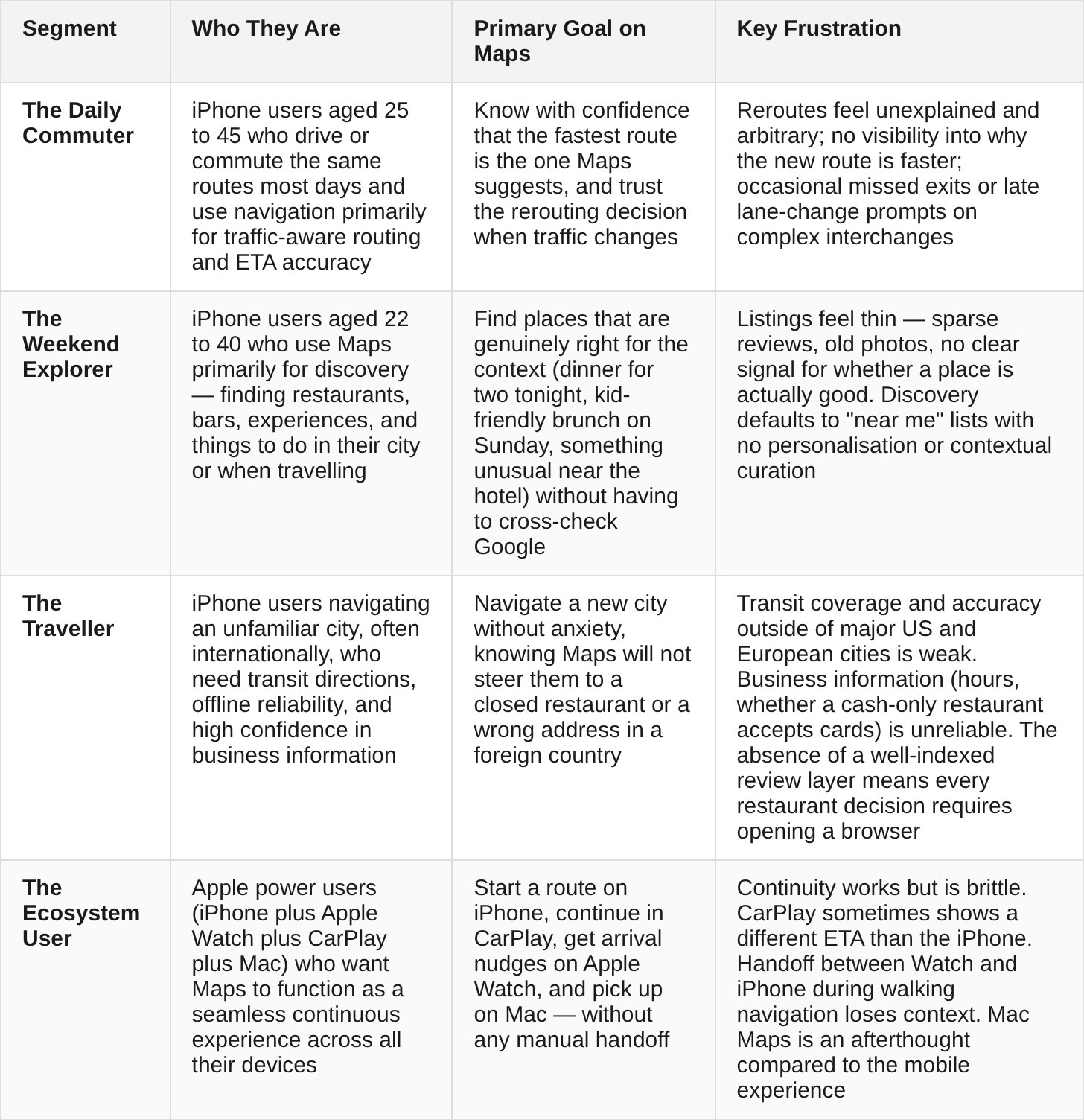
Primary focus: The Weekend Explorer and The Daily Commuter. These two segments represent the highest-volume, most recoverable churn from Apple Maps. The Traveller is important but is harder to address without large-scale international data investment. The Ecosystem User is a smaller segment whose problems are more about polish than core product gaps.
Primary persona: Priya, 31, product manager at a tech company in San Francisco. She has an iPhone 16 Pro, Apple Watch Series 10, and a car with CarPlay. She uses Apple Maps every day for her commute from the Mission District to SoMa and trusts it completely for that 15-minute drive. But every Friday evening when she and her partner are deciding where to eat in a neighbourhood they do not know well, she opens Google Maps instead, because she trusts its review layer and “Popular times” feature to tell her whether a place is worth the trip. She knows she should stick with Apple Maps — she values her privacy and finds the interface cleaner — but the discovery gap pulls her to Google at exactly the moment that matters most.
Step 5: Map the Current Product and Diagnose Pain Points
What Apple Maps Already Does Well: Turn-by-turn routing accuracy in US cities is now genuinely competitive with Google on the roads most iPhone users drive daily. Lane guidance on complex interchanges has improved dramatically since 2021. CarPlay integration is the smoothest in-car experience available on any platform. Look Around’s rendering quality exceeds Google Street View on the devices that support it. Privacy architecture is exemplary — Apple processes location on-device and does not build advertising profiles. The Guides feature has strong design quality. The transit experience in New York, London, and Tokyo is reliable and well-integrated. Siri voice commands for navigation are faster than any comparable voice interface.
